스프링 AOP
스프링이란?
"IoC와 AOP를 지원하는 경량의 프레임워크"
IoC : 제어의 역행
AOP : 관점 지향 프로그래밍
경량의 : POJO
"유지보수가 용이한 코드"
IoC(제어의 역전) ▶ 낮은 결합도
AOP(관점 지향 프로그래밍) ▶ 높은 응집도
용어 정리
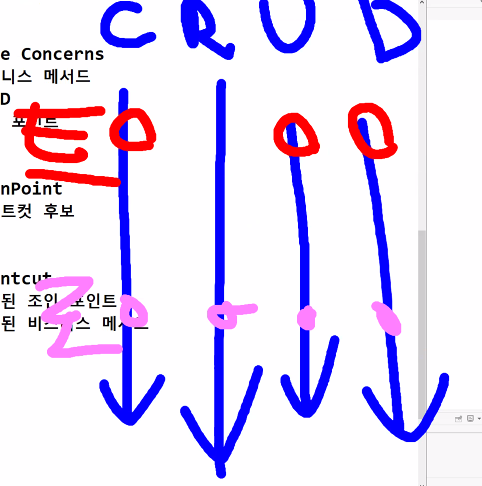
| 🐌 관심 분리 🐌 Separation of Concerns 비즈니스 메서드마다 공통으로 존재하는 코드들 이러한 코드들을 다른 클래스에 작성하는 것 (박혀있는 횡단 관심을 빼내는 것) |
🐌 횡단 관심 🐌 Crossing Concerns 로깅, 트랜잭션, 인증▪인가, 예외 처리 비즈니스 메서드마다 공통으로 존재하는 코드들 어드바이스 공통 로직 |
| 🐌 핵심 관심 🐌 Core Concerns 비즈니스 메서드 CRUD 조인 포인트 JoinPoint |
🐌 조인 포인트 🐌 JoinPoint 포인트컷 후보 (핵심관심이 AOP로 들어오면 조인포인트라 불린다) |
| 🐌 포인트컷 🐌 Pointcut 선택된 조인 포인트 선택된 비즈니스 메서드 (핵심관심이 AOP로 들어오면 포인트컷라 불린다) |
🐌 어드바이스 🐌 Advice 횡단 관심 비즈니스 메서드마다 공통으로 존재하는 코드들 '동작 시점'이라는 개념이 존재함 |
| 🐌 위빙 🐌 Weaving 포인트컷으로 지정한 핵심 관심 메서드가 호출될 때, 어드바이스에 해당하는 횡단 관심 메서드가 삽입되는 것 스프링에서는 런타임 위빙 처리만! (런 == 실행 : 즉, 실행시에만 위빙 처리됨) |
🐌 에스팩트 🐌 Aspect 포인트컷과 어드바이스의 결합 어드바이져 (Advisor) 애스팩트 설정에 따라 위빙을 처리하는 스프링 |
ex) 조인포인트(비즈니스 메서드)가 4개 있다
트랜잭션 횡단관심사의 포인트컷(비즈니스 메서드에서 선택된 것)은 CUD이다
package com.example.biz.common;


// 로그찍는 횡단관심사
public class LogAdvice {
	public void printLog() {
		System.out.println("[로그] 유진이의 로그");
	}
}
로그 찍는 LogAdvice.java 생성
@Service("bs")
public class BoardServiceImpl implements BoardService {
	@Autowired
	private BoardDAO boardDAO;
	private LogAdvice logAdcive;
	// private 어드바이스(횡단관심사, 공통로직) 어드바이스

    // 일단 DI를 해줬다 (new 형태라 좋은 코드는 아님)
	public BoardServiceImpl() {
		logAdcive = new LogAdvice();
	}

	@Override
	public boolean insertBoard(BoardDTO dto) {
		logAdcive.printLog();
		return boardDAO.insertBoard(dto);
	}
	[ 생략.. ]
BoardServiceImpl.java에서
멤버변수 생성하고 insertBoard에서 호출
이제 로그가 먼저 찍한다
동작 시점이 핵심관심(DAO)보다 먼저다
package com.example.biz.common;

public class PlusLogAdvice {
	public void printLog() {
		System.out.println("[로그] 유진이의 향상된 로그");
	}
}
PlusLogAdvice.java 를 새로 만들었다고 치자
로그를 이걸로 바꾸고 싶으면
private PlusLogAdvice logAdcive;
이렇게 바꾸면 됨
근데 AOP는 "횡단관심사를 코드에 직접 사용하지 않는다"
위에서 한 거 AOP 설정으로 끼워넣어보기
AOP 적용 전 (나쁜 코드)
logAdvice.printLog();▪ 비즈니스 코드에 횡단 관심이 박혀 있음
▪ 로그 바꾸려면 코드 수정해야 함
AOP 적용 후 (좋은 코드)
▪ new 하지 않음
▪ AOP 설정으로만 연결
▪ 비즈니스 코드는 CRUD에만 집중
AOP 설정 흐름
1️⃣ 의존성 추가 (pom.xml) : aspectjrt, aspectjweaver
2️⃣ AOP 네임스페이스 추가 : xmlns:aop="http://www.springframework.org/schema/aop"
3️⃣ Pointcut 설정 : execution(* cohttp://m.example.biz..*Impl.*(..))
4️⃣ Aspect 설정 : <aop:before method="printLog" pointcut-ref="aPointcut"/>
< AOP 설정 해보기 >
1) .jarx2를 pom.xml을 통해 DI
<dependency>
    <groupId>org.aspectj</groupId>
    <artifactId>aspectjrt</artifactId>
</dependency>
<dependency>
    <groupId>org.aspectj</groupId>
    <artifactId>aspectjweaver</artifactId>
</dependency>
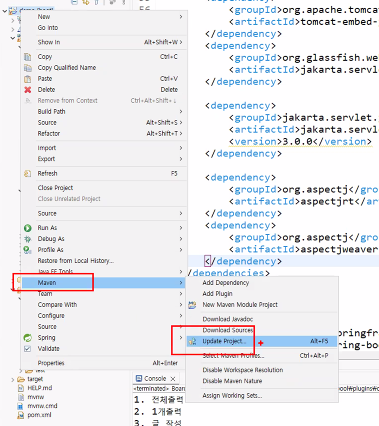
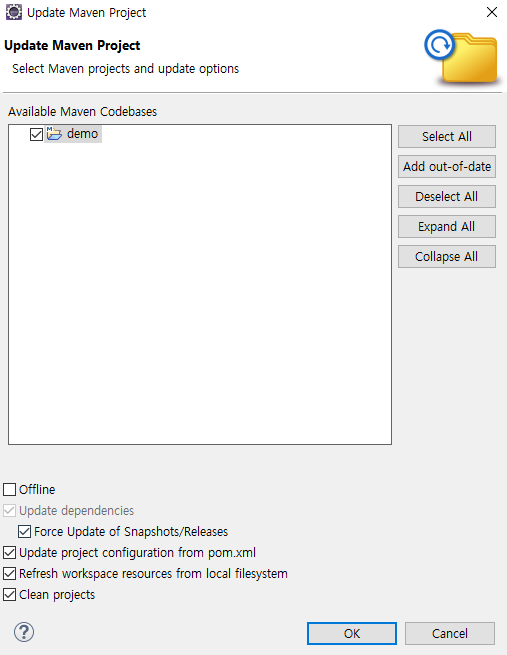
pom.xml 적용이 잘 안될 떄는
Maven ▶ Update Project ▶Force Update of Snapshots 채크 후 OK
2) applicationContext.xml을 AOP 스키마(네임스페이스) 추가
<?xml version="1.0" encoding="UTF-8"?>
<beans xmlns="http://www.springframework.org/schema/beans"
       xmlns:context="http://www.springframework.org/schema/context"
       xmlns:aop="http://www.springframework.org/schema/aop"
       xmlns:xsi="http://www.w3.org/2001/XMLSchema-instance"
       xsi:schemaLocation="
        http://www.springframework.org/schema/beans
        https://www.springframework.org/schema/beans/spring-beans.xsd
        http://www.springframework.org/schema/context
        https://www.springframework.org/schema/context/spring-context.xsd
        http://www.springframework.org/schema/aop
        https://www.springframework.org/schema/aop/spring-aop.xsd">

   		[ 코드 추가 될 예정 ]

   <context:component-scan base-package="com.example.biz" />
</beans>
[ 코드 추가 될 예정 ]에 들어갈 코드
<bean class="com.example.biz.common.LogAdvice" id="la" />
<bean class="com.example.biz.common.PlusLogAdvice" id="pla" />

<aop:config>
     <aop:pointcut expression="execution(* com.example.biz..*Impl.*(..))" id="aPointcut" />
     <aop:pointcut expression="execution(* com.example.biz..*Impl.get*(..))" id="bPointcut" />
     <!-- 표현식
     expression = 표현식 | 표현식에 해당하는 애를 id=" "에 있는 걸로 부르겠다~ 라는 것
     함수명 : com.example.biz..*Impl.* / (..) : input / 맨 앞의 * : Output
     com.example.biz 하위의 모든
     위 : CRRUD : * = 모두 5개
     아래 : RR : get으로 시작하는 것만 2개
     -->
     <aop:aspect ref="어드바이스객체명">
        <aop:before method="그객체가갖는메서드명" pointcut-ref="포인트컷이름"/>
     </aop:aspect>
</aop:config>
🔼 추가된 코드
이제 로그를 찍는 걸 new 해줘야 한다
pointcut은 조인포인트들 중에 선택된 것
aop 설정
1) 포인트컷 설정
선택될 비즈니스 메서드를 정의
내가 가진 CRUD중에서 뭐를 공통로직과 엮을 건지 정의하는 것
포인트컷 표현식
2) 애스팩트 설정
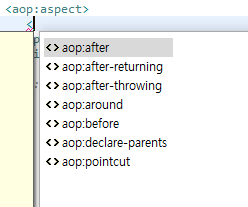
맨 위에서 부터 5개가 동작시점이다
순서대로 총 5가지의 동작시점을 해석하면 이렇다
1. after : 핵심 관심사 호출 후
2. after-returning : 핵심 관심사 반환값이 있었고, 그걸 반환한 다음
3. after-throwing : 핵심 관심사에서 예외 발생하면
4. around : 핵심 관심사 전후
5. before : 핵심 관심사 전
<aop:aspect ref="어드바이스객체명">
	<aop:동작시점 method="그객체가갖는메서드명" pointcut-ref="결합할포인트컷명"/>
</aop:aspect>
아까 우리는 서비스 들어오자 마자 로그를 찍었다 == before
이렇게 applicationContext.xml 전체 코드
<?xml version="1.0" encoding="UTF-8"?>
<beans xmlns="http://www.springframework.org/schema/beans"
       xmlns:context="http://www.springframework.org/schema/context"
       xmlns:aop="http://www.springframework.org/schema/aop"
       xmlns:xsi="http://www.w3.org/2001/XMLSchema-instance"
       xsi:schemaLocation="
        http://www.springframework.org/schema/beans
        https://www.springframework.org/schema/beans/spring-beans.xsd
        http://www.springframework.org/schema/context
        https://www.springframework.org/schema/context/spring-context.xsd
        http://www.springframework.org/schema/aop
        https://www.springframework.org/schema/aop/spring-aop.xsd">

   <context:component-scan base-package="com.example.biz" />


   <bean class="com.example.biz.common.LogAdvice" id="la" />
   <bean class="com.example.biz.common.PlusLogAdvice" id="pla" />

   <aop:config>
         <aop:pointcut expression="execution(* com.example.biz..*Impl.*(..))" id="aPointcut" />
         <aop:pointcut expression="execution(* com.example.biz..*Impl.get*(..))" id="bPointcut" />
         <!-- 함수명 : com.example.biz..*Impl.* / (..) : input / 맨 앞의 * : Output
         com.example.biz 하위의 모든 이하는 뜻
         위 : CRRUD : * = 모두 5개
         아래 : RR : get으로 시작하는 것만 2개
         -->
         <aop:aspect ref="la">
         	<aop:before method="printLog" pointcut-ref="aPointcut"/>
         </aop:aspect>
         <aop:aspect ref="pla">
         	<aop:before method="printLog" pointcut-ref="bPointcut"/>
         </aop:aspect>
   </aop:config>
</beans>
공통 관심사 호출해보기
package com.example.biz.board;

import java.util.Scanner;

import org.springframework.context.support.AbstractApplicationContext;
import org.springframework.context.support.GenericXmlApplicationContext;

public class BoardClient {
	public static void main(String[] args) {
		Scanner sc = new Scanner(System.in);
		AbstractApplicationContext factory = new GenericXmlApplicationContext("applicationContext.xml");

		BoardService boardService = (BoardService)factory.getBean("bs");

		while(true) {
			System.out.println("1. 전체출력");
			System.out.println("2. 1개출력");
			System.out.println("3. 글 작성");
			System.out.println("4. 글 삭제");
			System.out.println("0. 종료");
			System.out.print(">> ");
			int command = sc.nextInt();
			if(command == 0) {
				break;
			}
			else if(command == 1) {
				System.out.println(boardService.getBoardList(null));
			}
			else if(command == 2) {
				System.out.print("출력할 글 번호 입력 >> ");
				BoardDTO dto = new BoardDTO();
				dto.setBid(sc.nextInt());
				boardService.updateBoard(dto);
				System.out.println(boardService.getBoard(dto));
			}
			else if(command == 3) {
				BoardDTO dto = new BoardDTO();
				System.out.print("글 제목 입력 >> ");
				dto.setTitle(sc.next());
				System.out.print("작성자 입력 >> ");
				dto.setWriter(sc.next());
				System.out.print("글 내용 입력 >> ");
				dto.setContent(sc.next());
				boardService.insertBoard(dto);
				System.out.println("작성 완료");
			}
			else if(command == 4) {
				System.out.print("삭제할 글 번호 입력 >> ");
				BoardDTO dto = new BoardDTO();
				dto.setBid(sc.nextInt());
				boardService.deleteBoard(dto);
				System.out.println("삭제 완료");
			}
		}

		factory.close();
	}
}
이 코드를 실행시켜보면?

spring이 다 new 해주고 출력도 해주고 있다..
글 작성의 경우 위에서 설정한 get이 아니기 때문에 로그가 하나만 나올 것이다
'🍃 Spring' 카테고리의 다른 글
| 애스팩트 설정 : after / returning (0) | 2026.01.24 |
|---|---|
| 애스팩트 설정 : throwing / around (0) | 2026.01.23 |
| 로그인부터 Board 목록까지의 흐름과 관련된 질문과 답변 (0) | 2026.01.22 |
| Controller에 Service가 생기면서 시작되는 2-Layer 아키텍처 정리 (0) | 2026.01.19 |
| Command 객체 생성 방식으로 DAO를 new하면 안 좋은 이유 (0) | 2026.01.19 |