< 변경 전 >
<?xml version="1.0" encoding="UTF-8"?>
<beans xmlns="http://www.springframework.org/schema/beans"
       xmlns:context="http://www.springframework.org/schema/context"
       xmlns:aop="http://www.springframework.org/schema/aop"
       xmlns:xsi="http://www.w3.org/2001/XMLSchema-instance"
       xsi:schemaLocation="
        http://www.springframework.org/schema/beans
        https://www.springframework.org/schema/beans/spring-beans.xsd
        http://www.springframework.org/schema/context
        https://www.springframework.org/schema/context/spring-context.xsd
        http://www.springframework.org/schema/aop
        https://www.springframework.org/schema/aop/spring-aop.xsd">

   <bean class="com.example.biz.common.LogAdvice" id="la" />
   <bean class="com.example.biz.common.PlusLogAdvice" id="pla" />
   <bean class="com.example.biz.common.AfterThrowingAdvice" id="ata" />
   <bean class="com.example.biz.common.AroundAdvice" id="aa" />
   <bean class="com.example.biz.common.AfterAdvice" id="afa" />
   <bean class="com.example.biz.common.AfterReturningAdvice" id="ara" />
   <aop:config>
         <aop:pointcut expression="execution(* com.example.biz..*Impl.*(..))" id="aPointcut" />
         <aop:pointcut expression="execution(* com.example.biz..*Impl.get*(..))" id="bPointcut" />
         <aop:aspect ref="la">
         	<aop:before method="printLog" pointcut-ref="aPointcut"/>
         </aop:aspect>
         <aop:aspect ref="pla">
         	<aop:before method="printLog" pointcut-ref="bPointcut"/>
         </aop:aspect>
         <aop:aspect ref="ata">
         	<aop:after-throwing method="printLog" pointcut-ref="aPointcut" throwing="exceptObj"/>
         </aop:aspect>
         <aop:aspect ref="aa">
         	<aop:around method="around" pointcut-ref="bPointcut"/>
         </aop:aspect>
         <aop:aspect ref="afa">
         	<aop:after method="printLog" pointcut-ref="aPointcut"/>
         </aop:aspect>
         <aop:aspect ref="ara">
         	<aop:after-returning method="printLog" pointcut-ref="bPointcut" returning="returnObj"/>
         </aop:aspect>
	</aop:config>
</beans>
< 변경 후 >
autoproxy
<aop:aspectj-autoproxy />어노테이션으로 AOP를 할거야 라는 설정이 필요하다
@Service 설정
@Servicebean태그를 어노테이션으로
어노테이션이 컴포넌트였는데
컴포넌트를 상속받는 애들이 3가지가 있었다
그중 내가 엮이는게 서비스이므로
그래서 어노테이션도 @Service를 하면 된다
포인트 컷 설정
// Pointcut  설정
@Pointcut("execution(* com.example.biz..*Impl.*(..))")
public void aPointcut() { }
@Pointcut("execution(* com.example.biz..*Impl.get*(..))")
aspect로 결합하기
@Aspect

@Before("aPointcut()")
public void printLog() {
    System.out.println("[로그] 유진이의 로그");
}
동작 시점을 결정
@Aspect : 나 결합할거야
@Before : 이 시점에
printLog : 얘를
전체 코드
package com.example.biz.common;

import org.aspectj.lang.annotation.Aspect;
import org.aspectj.lang.annotation.Before;
import org.aspectj.lang.annotation.Pointcut;
import org.springframework.stereotype.Service;

@Aspect
@Service
public class LogAdvice {
	// Pointcut  설정
	@Pointcut("execution(* com.example.biz..*Impl.*(..))")
	public void aPointcut() {}
	@Pointcut("execution(* com.example.biz..*Impl.get*(..))")
	public void bPointcut() {}

	@Before("aPointcut()")
	public void printLog() {
		System.out.println("[로그] 유진이의 로그");
	}
}
이런식으로 1번에서 4번 설정을
지금은 LogAdvice.java 파일에만 해주었지만
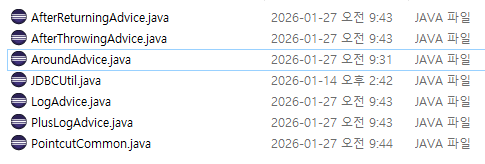
여러 파일에게 전부 똑같은 과정을 반복하며 설정을 해주어야 한다
그렇다면 중복되는 코드가 너무 많아지기 때문에
업그레이드를 시켜주겠다
< 업그레이드 >
package com.example.biz.common;
import org.aspectj.lang.annotation.Aspect;
import org.aspectj.lang.annotation.Pointcut;

@Aspect
public class PointcutCommon {
	@Pointcut("execution(* com.example.biz..*Impl.*(..))")
	public void aPointcut() {}

	@Pointcut("execution(* com.example.biz..*Impl.get*(..))")
	public void bPointcut() {}
}
여기에 있는 포인트컷이야 라고 명시해주는 형식으로
중복되는 코드를 PointcutCommon.java 파일을 만들어 중복을 제거해주었다
업그레이드 된 LogAdvice
package com.example.biz.common;

import org.aspectj.lang.annotation.Aspect;
import org.aspectj.lang.annotation.Before;
import org.springframework.stereotype.Service;

@Aspect
@Service
public class LogAdvice {
	@Before("PointcutCommon.aPointcut()")
	public void printLog() {
		System.out.println("[로그] 유진이의 로그");
	}
}
@Before("PointcutCommon.aPointcut()")LogAdvice에서 이렇게 어디에 명시된 포인트 컷을 사용할거다~ 라는 형식으로 바꾸어 주면 된다
'🍃 Spring' 카테고리의 다른 글
| @Transactional과 트랜잭션 정리 (0) | 2026.02.02 |
|---|---|
| 스프링에서의 JDBC : JdbcTemplate 클래스를 사용하는 스프링 (0) | 2026.01.28 |
| AOP 바인드 변수 완전정리 (0) | 2026.01.26 |
| 애스팩트 설정 : after / returning (0) | 2026.01.24 |
| 애스팩트 설정 : throwing / around (0) | 2026.01.23 |