바인드 변수
어드바이스에 인자로 선언되는 순간부터,
해당 어드바이스가 적용되는 핵심관심(핵심 비즈니스 로직)의 정보를 가져올 수 있음
바인드 변수를 활용한 코드 4가지 🔽
JoinPoint를 활용한 로깅 (PlusLogAdvice)
package com.example.biz.common;
import org.aspectj.lang.JoinPoint;
public class PlusLogAdvice {
	public void printLog(JoinPoint jp) {
		System.out.println("[로그] 유진이의 향상된 로그 시작");

		// 핵심 관심 메서드명
		String methodName = jp.getSignature().getName();
		System.out.println("핵심 관심 메서드명 : " + methodName);

        	// 메서드 인자 확인
		Object[] args = jp.getArgs();
		System.out.println("메서드 인자들을 받아올 수 있음");
		for(Object arg:args) {
			System.out.println(arg);
		}
		System.out.println("[로그] 유진이의 향상된 로그 끝");
	}
}
바인드 변수인 JoinPoint를 인자로 두는 순간부터,
이 어드바이스와 엮이게되는 핵심 관심의 정보를 받아올 수 있음

▪ 핵심관심 메서드명과 인자 파악 가능
▪ 단순 로깅용으로 유용
ProceedingJoinPoint를 활용한 성능 측정 (AroundAdvice)
package com.example.biz.common;

import org.aspectj.lang.ProceedingJoinPoint;
import org.springframework.util.StopWatch;

public class AroundAdvice {
	public Object around(ProceedingJoinPoint pjp) throws Throwable{
		String methodName = pjp.getSignature().getName();
		System.out.println("현재 수행중인 비즈니스 메서드 : " + methodName);

		StopWatch sw = new StopWatch();
		sw.start();

      		// 핵심 관심 메서드 실행
		Object returnObj = pjp.proceed();
		sw.stop();

		System.out.println("수행에 걸린시간 : " + sw.getTotalTimeMillis() + "ms");
		return returnObj;
	}
}
▪ ProceedingJoinPoint : JoinPoint를 상속받은 변수이다
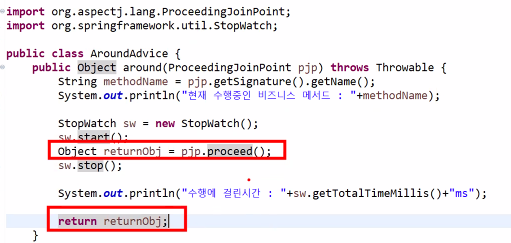
이 빨간 박스 안의 두 코드는 필수요소 이다

이런식으로 출력되기 때문에 내 코드가 얼마나 빠르게 돌아가는지 볼 수 있다
▪ 핵심 로직 수행 전/후 시간 체크 가능
▪ 성능 체크 가능
AfterReturningAdvice (반환값 처리)
package com.example.biz.common;
import org.aspectj.lang.JoinPoint;
import com.example.biz.board.BoardDTO;
import com.example.biz.member.MemberDTO;

public class AfterReturningAdvice {
	public void printLog(JoinPoint jp, Object returnObj) {
		System.out.println("[로그] +++ AfterReturningAdvice +++");

		// Board 중에 반환이 있는 것(boolean) 빼고 두 개이다.
		// boolean은 됐니? 안됐니를 측정하는 용도이기 때문에 제외
		if(returnObj instanceof BoardDTO) {
			System.out.println("게시글 관련 메서드");
		}
		else if(returnObj instanceof BoardDTO) {
			MemberDTO member = (MemberDTO)returnObj; // 다운캐스팅
			if(member.getMrole().equals("ADMIN")) {
				System.out.println(">> 관리자 로그인 <<");
			}
			else {
				System.out.println(">> 일반 로그인 <<");
			}
		}
		else {
			System.out.println("SELECT ALL 관련 메서드");
		}
		System.out.println("[로그] +++ AfterReturningAdvice +++");
	}
}
AfterReturningAdvice, AfterThrowingAdvice는 바인드 변수를 2개 작성 가능하다 : return이 있기 때문에
반환값이 있기 때문에 applicationContext.xml에서 returning 속성을 사용해
aspect 설정을 할 때 returning 값을 알려줘야 한다
<aop:aspect ref="ara">
	<aop:after-returning method="printLog" pointcut-ref="bPointcut" returning="returnObj"/>
</aop:aspect>


전체 출력과 하나 출력
selectAll은 list가 반환되기 때문에 instanceof BoardDTO에 안걸린다
[ else if 부분 ]
지금 반환된게 member이면 누구인지 체크를 하는데
instanceof의 다운캐스팅은 흔하다
▪ 반환타입을 보고 권한이나 등등 체크하기
▪ 특정 객체 타입에 따른 로직 처리
▪ SELECT ALL 같은 리스트 반환 시 분기 처리
AfterThrowingAdvice
package com.example.biz.common;
import org.aspectj.lang.JoinPoint;

public class AfterThrowingAdvice {
	public void printLog(JoinPoint jp, Exception exceptObj) {
		System.out.println("[로그] 예외발생시 출력되는 로그");
		System.out.println(exceptObj.getMessage()); // 어떤 예외인지 확인

		if(exceptObj instanceof NullPointerException) {
			System.out.println("oo월 oo일 확인된 에외");
			System.out.println("oo님이 조치함");
		}
		else {
			System.out.println("미확인 예외 발생!!");
		}
	}
}
바인딩 변수로 Exception도 붙일 수 있다
<aop:aspect ref="ata">
	<aop:after-throwing method="printLog" pointcut-ref="aPointcut" throwing="exceptObj"/>
</aop:aspect>
applicationContext.xml 설정은 이렇게 throwing 설정하면
▪ 예외 종류별 로그 출력
▪ 특정 예외에 대한 알림/조치 처리
▪ 예외 모니터링
핵심 요약
| Advice 종류 | 바인드 변수 | 기능 |
| Before / After | JoinPoint | 메서드명, 인자 확인 |
| Around | ProceedingJoinPoint | 메서드 수행 전후 처리, 성능 체크 |
| AfterReturning | JoinPoint + Object returnObj | 반환값 확인, 타입별 처리 |
| AfterThrowing | JoinPoint + Exception exceptObj | 예외 처리, 로그/알림 |
'🍃 Spring' 카테고리의 다른 글
| 스프링에서의 JDBC : JdbcTemplate 클래스를 사용하는 스프링 (0) | 2026.01.28 |
|---|---|
| AOP : @어노테이션으로 변경 (0) | 2026.01.27 |
| 애스팩트 설정 : after / returning (0) | 2026.01.24 |
| 애스팩트 설정 : throwing / around (0) | 2026.01.23 |
| 스프링 AOP와 🐌 용어 정리 🐌 그리고 공통 관심사 호출해보기 (0) | 2026.01.23 |